




Banks can redesign a mobile app without changing what happens behind it. Customers may see a modern interface while employees still navigate fragmented systems, manual workflows, duplicate data entry and decades of accumulated operational complexity. This creates a hidden dependency in banking customer experience: the quality of the front office is constrained by what happens in the back office. When employees struggle to locate information, understand system states or complete routine operations, customers experience the consequence through delays, inconsistent answers, errors and additional friction.
"Design creates culture. Culture shapes values. Values determine the future."
― Robert L. Peters
Legacy banking technology is not only an IT problem. It can become an experience, operational and strategic problem—especially when modern digital channels are layered onto systems and processes that were never designed for real-time, customer-centered service.
Customer experience starts before the customer sees the screen. It begins with the systems, rules, information and decisions that determine whether the bank can deliver what the brand promises. And even a beautiful user interface cannot indefinitely compensate for a fragmented backstage.
What Are Legacy Banking, Core Banking and Banking Back-Office UX?
Legacy banking systems become a strategic experience problem when architecture, workflows and employee tools transfer internal complexity into customer service.
Legacy banking systems are older or highly constrained technology platforms, applications and workflows that remain critical to banking operations but are difficult to change, integrate or scale. They can include core banking platforms, employee-facing applications, document systems, workflow tools and heavily customized operational software.
A core banking system is the central technology infrastructure that records and processes fundamental banking activities such as customer accounts, deposits, balances, transactions and lending. It is part of the wider banking technology ecosystem and should not be confused with every back-office interface employees use.
Banking back-office UX is the experience employees have when using internal systems, workflows and information to serve customers and operate the bank. It includes how easily employees can find information, execute transactions, complete compliance processes, recover from errors and coordinate work across systems and departments.
Customers may never see the bank’s legacy systems, but they experience their consequences.
Legacy technology and Experience Debt are related but different. Legacy technology refers to older or constrained systems and architecture. Experience Debt is the accumulated customer and operational liability created when fragmented or compromised experience decisions persist over time. A legacy system can create Experience Debt, but a modern technology stack can create it too if products, processes and teams remain disconnected.
A Digital Banking Experience Disconnect describes what customers experience when channels, messages and journeys no longer behave coherently. Legacy back-office systems are one possible root cause of that disconnect because they can produce fragmented data, inconsistent status and slow operational handoffs.
Legacy Back Office vs. Modern Banking Operations
| Legacy experience | Modern experience |
|---|---|
| Employees memorize codes | Searchable, understandable actions |
| Multiple disconnected tools | Connected workflow |
| Manual duplicate entry | Reusable and prefilled data |
| Errors discovered later | Real-time validation |
| Rules depend on employee memory | Contextual guidance |
| Paper handoffs | Digital workflow and traceability |
| Local system optimization | End-to-end service optimization |
| Training compensates for complexity | UX reduces unnecessary learning |
| Front and back office evolve separately | One experience strategy |
When Interface Design Turns Human Error Into System Risk
On January 13, 2018, a false ballistic missile alert was issued over television, radio and cell phones in Hawaii. People thought there was an incoming ballistic missile and sought shelter, because the message concluded with, "This is not a drill." It is hard to imagine what the Hawaiian people must have felt during the half hour before the next message informed them that it was a false alarm.

It looked like the fault was due to human factors as usual, but it was not. The failure was caused by a terrible interface design. “Real alarm” and “test alarm” options on the desktop were too similar, resulting in errors.
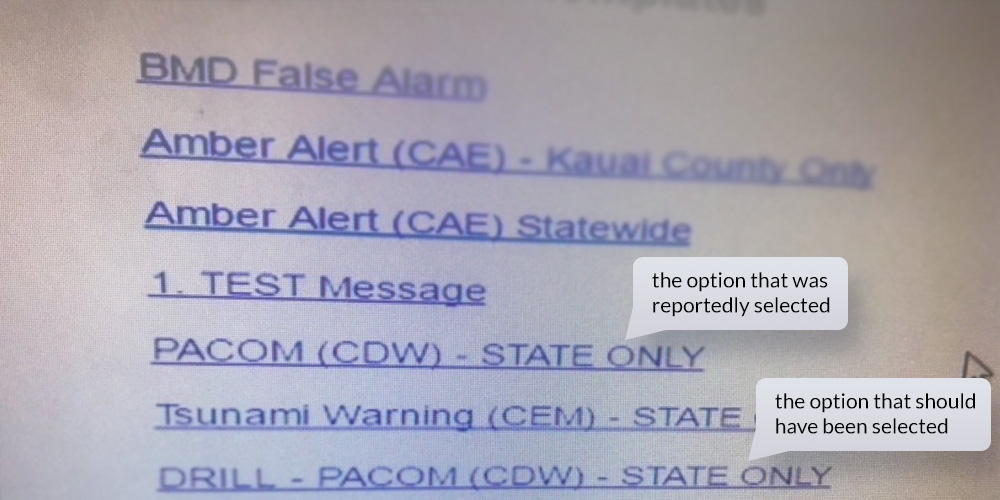
The Hawaii false missile alert illustrates a wider UX principle: when critical actions are difficult to distinguish, errors that appear “human” can actually be enabled by the system.
Banking has the same risk. High-stakes internal tools should not depend on employee memory, ambiguous labels or easily confused actions when the consequences involve customer money, compliance or operational risk.
Why Legacy Back-Office Systems Become a Customer Experience Risk
Customers rarely see the operational systems supporting their banking experience, but they experience their consequences every day. A slow account-opening process, an unexplained payment delay or conflicting information from support may originate far behind the mobile interface.
In August 2020, Citibank mistakenly transferred nearly $894 million of its own funds while acting as administrative agent for a Revlon loan. The incident involved a complex operational workflow in the Flexcube system and multiple levels of approval.
Citibank was meant to send about $8 million in interest payments to the cosmetic company’s lenders. Instead, they accidentally wired 100 times that amount by accidentally sending $900 million to Revlon’s lenders.
Behind Citi's embarrassing fiasco looms an antiquated Flexcube interface, compounded by a lapse in the scrutiny of approving authorities. According to Ars Technica, the bank's protocol mandated a 'six-eye' or a three-person review process for greenlighting a transaction of large amount. All three reviewers—a subcontractor, an associate in India, and a senior Citibank official in Delaware—assumed the transfer going to the internal clearing account and approved it.
The subcontractor presumed that ticking the 'principal' checkbox alone would confine the funds within the bank's system. It was later disclosed that he should have set both 'front' and 'fund' fields to the clearing account.

The Flexcube UI violates almost all design heuristics and UX principles and was not completely redesigned after 2001. The incident demonstrates how complex workflows, ambiguous system behavior and procedural controls can combine to create operational risk. Better interaction design, clearer transaction states and stronger validation could help reduce the likelihood of similar errors, but UX needs to work together with process and technical controls.
Some lenders did return the money, but others did not. Citibank filed a lawsuit in 2020 seeking the return of its funds. A federal district court initially ruled in 2021 that lenders holding roughly $500 million did not have to return the disputed funds, but the U.S. Court of Appeals for the Second Circuit reversed that decision in September 2022. Citi subsequently reached agreements with the remaining lenders, ending the litigation.
Could any customer imagine that such a disaster could happen in the bank's backstage, behind the fancy tall glass buildings and modern front office systems such as online banking and mobile banking apps? Few people are aware that all of this is based on the work of the back office. It seems unbelievable that, despite the up-to-date appearance, banks are still operating with back-office systems architected twenty years ago.
Employees accustomed to modern digital tools can face a steep learning curve when internal banking software depends on codes, outdated interaction patterns or fragmented applications. Even worse, if they were aware of the level of errors the system was causing, because even experienced employees find it extremely complex and confusing to work with, their trust in the institution might decrease dramatically.
A Bain & Company analysis shows that digital natives have generated 80% of the growth in market capitalization of the top companies over the past 10 years. But, if we look at bank's digital maturity model, we realize that, despite it being the 21st century, most of the banks are still in the manual stage.
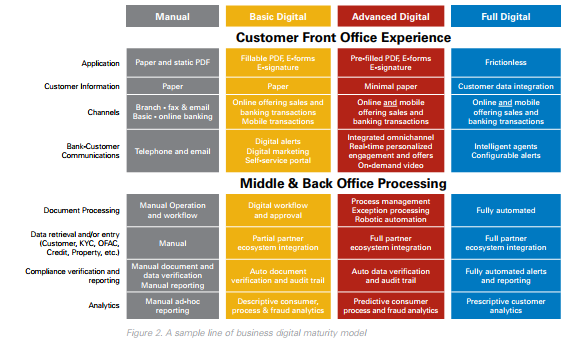
Source: kofax.com
Customer UX focuses on how customers interact with financial services, while Employee UX focuses on how staff use internal systems and workflows to deliver those services. They are different experiences, but they are operationally connected.
If employees cannot efficiently interpret customer information, execute processes or recover from errors, customer-facing UX eventually suffers regardless of how polished the mobile interface appears.
Banking Customer Experience Starts in the Back Office
One of the best-known entrepreneurs, Richard Branson, has said, “Clients do not come first. Employees come first. If you take care of your employees, they will take care of your clients.” In the world of business, it's a well-known truth that motivating employees is essential for the growth and success of the company.
Customer-facing UX is only the visible layer of banking experience. Behind every onboarding request, card replacement, payment investigation or account change are operational systems and employee workflows that determine how quickly and accurately the bank can respond. When those internal journeys are fragmented, customers eventually experience the fragmentation themselves.
Many financial institutions have done a lot to improve the digital customer experience. Digital banking has become more convenient, and now clients are able to conduct transactions and other activities via their mobile phones. Unfortunately, there are many financial organizations that disregard their employees─those who, at the end of the day, are the ones who ensure a satisfactory customer experience.
Employee experience and customer experience are operationally connected. If employees need five systems, handwritten notes and manual workarounds to resolve one customer request, even excellent service intentions will struggle against the process.
Manual paperwork still dominates the bank back office, even though there are thousands of customer requests that employees need to address. In the end, it not only causes system and human errors but also takes a lot of time and makes the process painful and unpleasant for their customers. What about creating a user experience for employees that would result in customer satisfaction?

What Does Poor Back-Office UX Cost a Bank?
Higher Cost-to-Serve
Employees spend more time resolving routine requests.
Operational Errors
Manual entry and memory-dependent workflows increase error risk.
Longer Training
Complex internal systems require more learning and specialist knowledge.
Slower Customer Service
Information and actions are distributed across tools and departments.
More Rework
Missing or incorrect data causes tasks to return through the workflow.
Lower Transformation Speed
Every new customer-facing capability depends on difficult legacy integration.
Reduced AI Readiness
Fragmented systems make it harder to embed intelligence into operational workflows.
Customer Trust Risk
Operational inconsistency eventually becomes visible through delays and errors.
10 Ways Legacy Banking Systems Damage Customer Experience
Explore 10 real-life experiences from the daily life of a banking employees, and how a successful financial UX design can solve these problems.
1. Truth: Front-End Modernization Leaves the Back Office Behind
Front office is the division of the company that has direct contact with the clients, whilst the back office provides the required documentation and technical support to the front office to facilitate the course of work and the business transactions.
The top priority for most banks is to improve the digital customer experience. But legacy modernization does not always require a full core replacement. Depending on architecture, risk appetite and business priorities, banks may modernize incrementally through APIs, modular services, orchestration layers, workflow redesign, coexistence with new platforms or eventual core migration.
Replacing a core banking platform can be one of the most complex technology transformations a financial institution undertakes. For many banks, the practical question is not whether the existing core is old, but which constraints actually prevent better customer and employee outcomes.
Some problems can be addressed by modernizing employee workflows, exposing core capabilities through APIs, improving data access, automating manual processes or moving selected functionality into modular services. Others may eventually require deeper core replacement.
The modernization strategy should follow the business and experience problem—not the other way around. The bad news is that not every bank uses design thinking and has UX architects for their digital ecosystem development. And not every core banking vendor provides user-centered, modern-looking, automated solutions.
2. Truth: Hidden Operational Complexity Surfaces in Customer Journeys
Metaphorically, we can say that the app interface is the visible tip of the banking experience iceberg. Beneath it sit core systems, operations, compliance processes, employee tools, data flows, vendors and organizational decisions. When those layers are disconnected, a redesign of the visible interface may improve perception temporarily while leaving the underlying causes of customer friction untouched.
Above the surface
- Mobile banking
- Online banking
- Branch interactions
- Customer communication
- Support
Below the surface
- Core banking systems
- Employee workflows
- Operations
- Data architecture
- Compliance rules
- Approval logic
- Vendors and integrations
- Organizational ownership
Customers do not see the layers beneath the surface, but every one of them influences what customers eventually experience.
The same can be attributed to the management of banks. They invest a lot in the “visible part of the iceberg” that makes the customers falsely assume that there is a high level of digitization across all financial organizations. Conversely, the real situation can be seen in the images below.

For some banks' the back-office systems still look like this. In order to work with it, employees have to read the instructions first, then manually enter the codes to choose the required function. Learning to operate with this kind of system takes approximately a month.
Real-life experience:
We were discussing partnership options on redesigning a back-office solution with a large retail bank. We went to their office meeting room for clients. It was beautifully designed and full of expensive furniture. During our conversation, we found out that the budget for getting a better designed solution was half the cost of the chairs in the room!
This example may say a lot about the priorities of banks. If we talk about the financial side of banks, the overall picture is quite simple. Stakeholders want to make a profit and reduce all expenses. Usually, the highest expenses are operating expenses, which include salaries, office, IT costs and much more. And, if the company values are all about reducing operating costs, will it invest in digital back-office transformation for employees?
Many banks are trying to reduce their back office costs, often not realizing the impact on the customer experience. This results in a paradox: banks are investing large amounts of money in digital transformation in order to improve the user experience, whilst cutting the costs of the core banking system leads to significant damage to customer service.
Bank employees’ negative experiences affect service quality and customer satisfaction. Improvements in the back-office system could lead to a meaningful increase in service quality and speed, resulting in happier, more satisfied clients.
3. Truth: Internal Rules Can Override Consistent Customer Experience
Many customers know that banks may apply exceptional rules (like a personal manager or special price plans) for customers who have high-balance accounts. But a lot of customers might have no idea that some of the rules applied to “exceptional” clients can be in violation of the official bank's internal policy rules and could also overstep ethical values.
In the first month, an employee who has recently been hired needs to learn the Know Your Customer (KYC) principles and identity rules. Employees have to memorize these exceptional clients because it is forbidden to ask them for an ID document when they come to the branch. That is against the standard procedure and could cause a security breach because new employees don't always know who is special and who is not.
Real-life experience:
A new employee who had been working for only a few months was serving a client as usual and asking him for a passport. The client instantly got angry and explained that he is never asked to show the ID documents, so he had left them at home. The employee politely explained that every client must be identified. At that moment, one of the experienced colleagues walked by, recognized the client and started apologizing to him. It turned out the standard identification procedure did not apply to “special clients” who have an account balance of at least 6 digits, and it is forbidden to ask them for an ID.
The digits are the priority not people. This kind of mindset is quite widespread. When a person starts working at a financial organization where this kind of thinking dominates, soon they become like others and start thinking in the same patterns.
For example, an employee who had recently started working at a bank became a witness to a conversation between two friends─one very wealthy and considered “special” and the other just the “usual client.” During the conversation, they discovered the dramatic differences in the banking service that was provided to them. The employee probably would feel ashamed and wouldn't even know what exactly to say if asked, “why such unfairness?”
Real-life experience:
A client came to the branch to open another bank account. The employee filled out all the required documents and informed the client that the standard process takes approximately two weeks. The client asked if it's possible to speed it up because he wanted to receive the next transfer to the newly created account. The employee went to the head of the department who told him that it's possible to activate the account within one week, but they need to check the client’s profile. As the balance of the current account was only around 600 EUR, the client wasn't considered “a big fish,” and his request was denied. After a week or so, the client returned to the branch for additional paperwork in connection with the incoming transfer. The head of the department was addressed repeatedly, but this time he got indignant, asking why the employee hadn't contacted him the first time (even though he did but was declined). The manager declared that the account will be activated the same day. A lot of things went through the mind of the employee at that moment, but one thing was clear: the bank activated the account because the amount of transfer the client was expecting exceeded 1 million EUR.
Customer experience becomes inconsistent when service depends on undocumented exceptions, employee memory or informal escalation. Different customers may receive different answers not because the intended proposition differs, but because the operational rules are unclear or unevenly applied.
Strong internal UX makes policies, exceptions and decision authority visible within the workflow instead of requiring employees to remember them.
Truly human-centered organizations perceive their customers not as wallets, but as humans whose problems must be solved. Those companies provide care and value to make the world a better place for living. Such an attitude inspires their employees and customers so, at the end of the day, the companies get needed funds and support to scale up their impact.
4. Truth: Technology Requirements Replace Employee and Customer Needs
Problems arise when technology implementation is separated from the context in which employees and customers actually use it. A feature may satisfy a technical requirement while remaining difficult to discover, interpret or integrate into the wider service journey.
Empathy is the core of creating a product that provides solutions for clients’ problems and pains. Sometimes, the IT department of a bank, whilst great at solving complex programming issues, can't imagine what the user scenarios will be, what is the usage context and how it impacts customer service. Technical completion is not the same as experience completion.
Real-life experience:
The bank's IT department had to integrate a new function connected with cash operations. Serving a client, an employee needed to use the new feature but wasn't able to find it in the system. He thought that, since the function had a connection with cash operations, it could be grouped together with the other cash functions, but that wasn't the case. As a result, the employee had to call the IT department. They explained that the function could be found under the section “Other.”
Needless to say, in this situation, the client was frustrated because it took a long time to complete the operation, and it seemed that something was not right, either with the employee’s knowledge or with the client’s account which resulted in stress and anxiety.
Most likely, in this case, the IT department didn't even consider this situation their mistake. They were told to add a function, so they did. And, from the customer’s viewpoint, was it a good service? Did it give a good impression of the bank?
To solve these kinds of situations, banks could create a position of Chief Experience Officer whose duty would be to ensure that the business processes and services are designed according to customer and employee needs.
5. Truth: Frontline Knowledge Is Disconnected From Product Decisions
Frontline and operational employees see recurring friction that analytics may not reveal: where customers repeatedly ask for clarification, where staff create workarounds and where internal systems slow service.
When this knowledge has no structured route into product and operations teams, the organization repeatedly pays for problems it already knows exist.
Employee feedback should therefore become an input into UX research and operational prioritization—not a substitute for research, but an important source of diagnostic evidence.
Banks have historically been very conservative in hierarchy rules. That's understandable, because they are holding third-person money reserves. The problem is that some managers and executives pretend that the innovations and fast digitized financial world does not apply to them. Or, even better, they acknowledge the needed changes but try to make others and themselves believe that it's still possible to survive with the traditionally conservative mindset. The question is...for how long?
This kind of culture value might be damaging for the people who have high potential. They have only two options: to become the same as other or leave the organization.
How can you change a mindset like this that is rooted deep in the bank’s structure? The answer is to disrupt the culture of the organization. To challenge all the possible status quo and search for better solutions. It is incumbent upon us to find those employees we described, make them innovation ambassadors and put them in the place of those executive team members who blindly reject the need to change.
6. Truth: Fragmented Systems Increase Cognitive Load
As one of the bank employees said: “When I was accepted for a position at a bank, my friends who had been in touch with the financial institutions warned me about the complexity of the back-office software I'd have to face. At that time I thought, it can't be so bad, the bank seems really modern. But, when I finally saw it with my own eyes, I was shocked. It looked like some computer programmes I had seen in my childhood, about 20 years ago. I wondered, is this a joke?” Turned out, it wasn't.
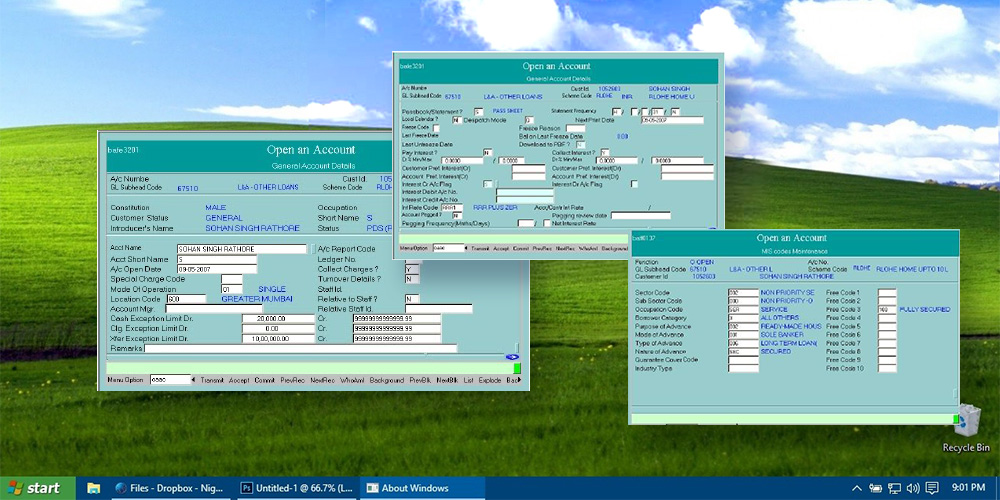
A similar example of how some core banking systems look like
When an employee is put in front of a system like this, all of the illusions about a job at a modern, innovative bank fade, especially if there is a millennial in this position. A comparison here can be made. Imagine your discomfort and shock if you had to switch from an iPhone to an old Nokia.
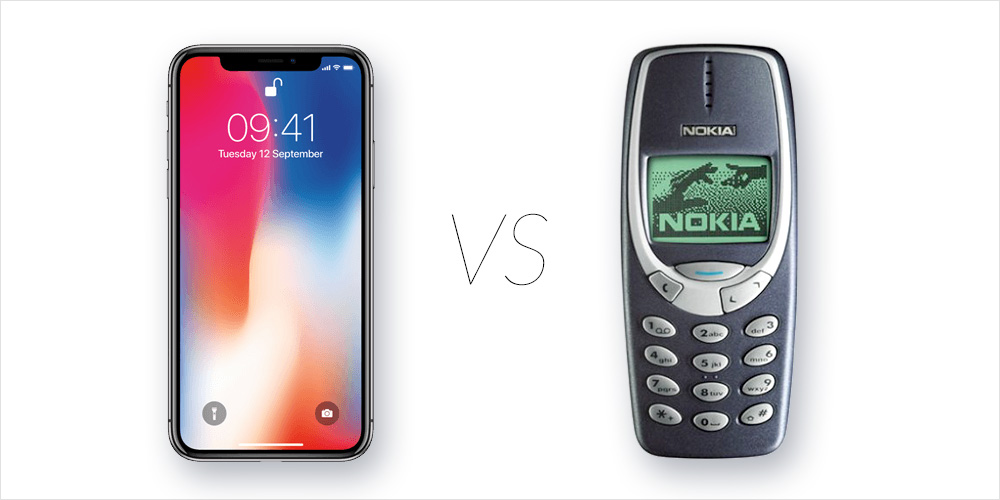
A bank employees may need to move between up to four several applications with different navigation models, terminology and data structures to complete one customer request. The cognitive burden comes not only from complexity within each system but from continuously translating between systems. Employees must remember where information lives, how each application behaves and which manual workaround connects them. With this amount of information, the risk of making mistakes increases dramatically, and let's not forget we are discussing finances here.
The organization may see several functioning systems. The employee experiences one fragmented workflow.

Another crucial factor: most often, these different core banking software systems are provided by different vendors, so the design and information architectures are totally different. The employees should make a great effort to learn how to solve this puzzle, instead of investing the time in figuring out how to make customers happy. By the way, all the needed functions are often not included in those multiple programmes, so the employees have to use MS Excel.
The right solution from the design thinking mindset would be to perceive everything as a whole, instead of fragmented, unconnected parts. In this case, it should be one system that is consistent and connected, that applies the same principles and rules for action, so that the employee doesn't have to adapt to the different features of every system.
There is no doubt that, when it comes to finances, it's extremely important to ensure a proper security configuration, but it should not impact the employee journey and ruin service flow.
The proper way of ensuring the right information and visual architecture is by conducting full user research, mapping pain points and defining and identifying key user personas and scenarios. Only after user-centered design process can the product then be tested. Once the tested architecture has been implemented into a design, a specialised Design System works as an unifier.
A design system can standardize interaction patterns, components and terminology across employee-facing applications, but visual consistency alone cannot fix fragmented processes or data. It should work alongside workflow redesign, information architecture and technology modernization.
| Employee experience | Customer consequence |
|---|---|
| Multiple systems for one task | Longer service time |
| Manual re-entry of information | Errors and duplicated requests |
| Codes instead of clear labels | Higher training burden and mistakes |
| Different information across systems | Conflicting customer communication |
| Missing validations | Rework and repeated customer contact |
| Slow system response | Waiting and service delays |
| Paper handoffs | Lost context and poor traceability |
| Weak error recovery | Escalations and operational risk |
7. Truth: Poor Back-Office UX Increases the Risk of Human Error
People are used to the comfort of digitalization: food ordering by phone, online stores, e-government, voice assistants, even medical monitoring by wearables. Customers expect the same automation level in banks. After all, they trust the employees to help manage their finances.
Human error should not automatically be treated as evidence of employee carelessness. When systems require memorizing codes, manually transferring information or interpreting ambiguous controls, predictable mistakes become more likely.
Good operational UX creates guardrails: clear labels, contextual validation, meaningful defaults, confirmation of consequential actions and recovery paths when something goes wrong.
In high-stakes financial systems, error prevention is part of experience design.
The daily job in client service takes up a lot of an employee's energy. It is necessary to adapt to every customer, to understand their needs and find a better solution. Sometimes (and not rarely), there are demanding clients who morally push the employee. Of course, with this kind of stress and overall workload, there is a high probability of mistakes. To fix the mistake, the employee should call the client and ask to come back to the branch. This is usually an embarrassing process resulting in the client being very angry, so it is double the stress and negativity for the employee.
As Howard Rheingold has said, “When designers replaced the command line interface with the graphical user interface, billions of people who are not programmers could make use of computer technology.” It might sound ridiculous, but banking employees still have to remember the ciphers and/or codes to use the full functionality. Most often, it's very difficult to make sense of all the ciphers and/or codes and the function they activate because there is no logical, understandable connection. The employee just has to memorize a huge amount of information. So, there is no intuitive way through user-centered information architecture to find the necessary function quickly and without a lot of effort.

To access the function the employee has to manually enter the code consisting of letters and numbers displayed on the screen
Real-life experience:
A client wanted to sign a deposit agreement with interest payment frequency every three months. First, the employee had to find the function through a code or in the list. After that, he had to select the type of deposit─not by name, but by a code. The employee had written down all of the codes in his notebook, so it took some time to find the right number and letter combination to enter in the system. When that was done, the employee had to indicate the interest payment frequency that also required a code. Unfortunately, the employee didn't know the exact code for this function, so he used a similar one that could also apply to this situation. Finally, the client (kind of annoyed about how long the process took and surprised about the employee using the notebook) signed the papers and left. After a while, the employee received a call from the Deposit Department asking, “Are you sure that the client doesn't want interest payments?” As it turned out, the employee’s assumption of the correct code was wrong. The employee was disparaged and had to call the client and ask to come back to the branch to re-sign the agreement.
Who was responsible for this mistake─the employee or the core banking software? One of the main UX principles is that the interface should be foolproof and intuitive. The user must be able find the required function with minimal effort and be safe from failure or misunderstanding. Maybe instead of investing tons of time and money in employees’ learning and failure solving, it might be more beneficial to make the software usable.
Digital transformation is about eliminating paperwork and implementing usable automation tools to manage the documents. Also, as a part of eliminating mistakes in core banking with UX design, it is really important to create a Failure Map, recognising actions, patterns and conditions that lead to upcoming errors and ensuring they are reduced.
A Failure Map identifies where users are likely to misunderstand a process, enter incorrect information, miss a dependency or trigger an unintended consequence. For high-risk internal banking workflows, mapping these failure conditions can be as important as mapping the ideal customer journey.
The objective is to design systems that prevent predictable errors rather than relying only on employee training to catch them.
8. Truth: Internal Systems Fail to Guide Employees Through Complexity
Looking at this from the UX perspective, the productivity of the core banking software could be increased dramatically if the back-office system could “communicate” with the employees, guide them if necessary, give a learning tip and remind them if something is forgotten. This could result in a significant reduction of human errors.
Modern employee tools can use contextual validation, prefilled data, intelligent search and AI assistance to reduce unnecessary memory work. The objective is not to automate every decision, but to make the system better at recognizing missing information, unusual patterns and likely next steps. AI becomes particularly valuable when embedded into operational workflows rather than added as a separate chatbot.

Example of a real-time checking that might help reduce the errors
Real-time checking is actively used in customer forms. The support of artificial intelligence in banking allows the prevention of mistakes by analyzing previous failures and considering the context. This could be implemented in the back-office solutions as well. For example, after entering the account number, the system automatically displays the client's name and other details that the employee would otherwise have to fill out manually. Also, employees have confessed that, when working with foreign clients, an incorrect spelling of the name is a common mistake. A smart, user-centered banking software could automatically provide the correct name and save both the customer and the employee from making mistakes.
AI can improve internal search, knowledge retrieval, anomaly detection, process guidance and decision support. But its value is constrained when critical information remains fragmented across legacy systems or when core workflows cannot easily consume real-time intelligence. This creates a new modernization pressure: legacy architecture may not only slow current operations—it may limit how effectively banks can operationalize AI in the future.
Real-life experience:
A client wanted to open an account for his company. The employee filled out the form and submitted it to the department that had to review it. After a while, the employee received a call. He had left out the field of the year when the company was established. As all of the forms were filled out on the computer, it was forbidden to just fill the empty space by hand. So, the employee had to call the client and ask him to come back to the branch to resign the documents.
This wouldn't have happened if the software communicated with the employee, notifying that it's not possible to finish the process because there is an important field left blank.
Real-life experience:
At some banks, there is a possibility of ordering cash withdrawals for a third person. A client requested a cash order for his friend, who would receive it the next day. The employee had to fill out a special form with many input fields, but he knew from his experience that it is was not necessary to fill all of them. The next day, the employee received a call from the cashier who told him that a person had arrived for the cash, but it was impossible to give it out because all of the fields had not been filled out. The employee tried to explain that this is not the first time he had submitted a form with blank fields, and it had always been accepted. The cashier refused to accept the form, and the client did not receive his money.
In this case, there wasn't a clear understanding of the quality standards that resulted in an unpleasant situation, not only for the client but for the employee as well. We need to take the financial solutions out of the “dark room” by ensuring their сompliance with usage patterns, perception laws and user expectations. In the digital age, software should adapt to the users and not vice versa. User-centered design process could help to solve this problem by reducing the learning curve and cognitive load.
9. Truth: Manual Processes Create Delays, Rework and Lost Context
Paper and manually transferred data introduce handoffs where information can be delayed, duplicated or lost. The problem becomes especially visible when several departments participate in one customer request but no shared workflow provides clear ownership and status. From the customer’s perspective, the request disappears into the bank.
When the organization has the documents in paper format, and they have to be reviewed by two or three different departments, it's no surprise that something gets lost… and that something might be critical for the client.
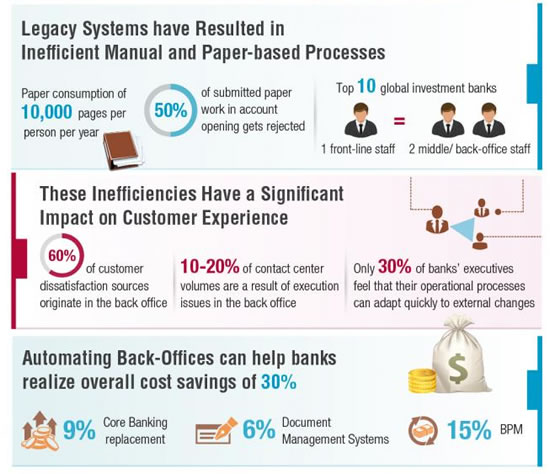
Source: Capgemini Consulting
As we can see from the infographic, automating and improving banking back offices can not only dramatically increase the customer and employee experience but also help banks realize overall cost savings as high as 30%.
Real-life experience:
A client requested a new payment card and chose to pay the additional fee in order for the process to be expedited. The employee filled out all the forms and promised that the card would be ready the next day. When the client arrived for his new card, the bank had nothing to give him. As it turned out, the request for the card was lost somewhere between the departments. The situation was made even more frustrating and unpleasant for the client because he had a business flight in a few hours and had ordered the card specifically for the trip.
It really seems unbelievable that this kind of situation is still possible in the age of digitization. We are talking about huge banking institutions with billions of dollars owned by people. How is it even possible that something can just get lost? And, if this is a document, then where is the guarantee that the next time it won't be money? Situations like this critically lessen the trust in banks. It is no secret that this results in more and more people deciding to leave their banks and trust traditional financial solution alternatives like FinTech.
This could be solved by a centralised banking software, that would allow employees to fill out the forms digitally and quickly with minimal effort, store all the information in one database and make it not only easily accessible for all the involved departments but even deliver a notification that a new high-priority request has come in that has to be reviewed immediately.
10. Truth: Technical Instability Becomes a Customer Experience Problem
An internal system outage may never be visible directly to the customer, but its consequences are: delayed transfers, unavailable reports, postponed appointments and employees unable to complete service requests. Operational resilience is therefore part of customer experience.
Unfortunately, human errors are not the only ones. There are also system errors or “bugs.” Of course, this happens with every software, but, unfortunately, banking employees have to face the bugs much more often than acceptable. Even more so, let's remember we are talking about a banking software that has to be especially safe and stable.
Real-life experience:
A client was buying new equipment for his business. He and his business partner came to the bank to make a transfer of 300K. As this was a deal of a considerable amount, the business owners had come to the branch to fill out some additional paperwork. The two businessmen were waiting in line for about 20 minutes, when the employee came to them and told that, unfortunately, the system was not responding and they could try to come back in an hour. Of course, this turned out to be a very unpleasant situation, because the busy man did not have more than two hours planned to make a single transfer.
There are also other types of errors. For example, the document suddenly doesn't save so the employee has to fill the form in again. Or, another error, the banking software is not able to perform several tasks at once.
Real-life experience:
A client knew that soon he'd have to make the last payment of his mortgage loan. So, he went to his credit manager and asked for his credit report. The employee selected the appropriate function in the banking system and entered a date. This was a voluminous report covering the last 20 years. For the next 15 minutes, they were both just sitting and staring at a wall because the software was very slowly generating the report, and there was no possibility of performing other tasks because other functions on the computer were simply not working.
To prevent such situations, software developers should uncover the most critical scenarios and how software should operate. It is really helpful to analyze “bottlenecks” by collecting employee feedback, thus taking out friction and greatly improving the customer experience.
Operational resilience is usually discussed in terms of system availability, continuity and risk. But usable employee workflows also matter. A technically available system can still create operational vulnerability if employees cannot understand it, recover from errors or complete critical actions efficiently.
How Banks Can Modernize Back-Office Experience Without Replacing Everything at Once
1. Diagnose the Highest-Impact Employee Friction
Map workflows, support data, errors and manual workarounds.
2. Identify the Structural Root Cause
Separate interface issues from process, data and architecture constraints.
3. Redesign the End-to-End Workflow
Optimize around the service outcome rather than individual applications.
4. Add Validation and Error Prevention
Reduce memory-dependent and ambiguous actions.
5. Connect Fragmented Systems
Use APIs, orchestration and shared data where appropriate.
6. Modernize Incrementally
Prioritize capabilities blocking the most valuable customer and operational outcomes.
7. Govern Employee and Customer Experience Together
Ensure back-office modernization supports the same experience strategy as customer-facing channels.
A Modern Banking Experience Requires a Modern Backstage
Some readers may think that all these banks we have described are outdated and operate in small villages. The truth is that almost all the aforementioned banks have quite modern-looking head offices in big cities and modern front-office systems. They are seemingly suited for the customers’ needs, with responsive online banking and awarded mobile banking apps.
Customers may never see the core banking platform, operational dashboard or internal workflow behind a financial service. But they experience the output of those systems every time they open an account, resolve a payment problem, request a document or ask the bank for help.
This is why legacy modernization cannot be evaluated only as an IT infrastructure initiative. Core systems, back-office workflows and employee UX determine how quickly, consistently and safely the institution can deliver the experience promised through its digital channels.
And redesigning only the customer-facing screen addresses the symptom at the top while leaving the structural cause untouched:
Customer symptom
“Why is this taking so long?”
↑
Employee friction
Multiple systems / manual work
↑
Process problem
Duplicated approvals / fragmented ownership
↑
Technology constraint
Legacy integrations / batch processes
↑
Operating-model issue
Systems and teams optimized independently
Modernization does not necessarily mean replacing every system at once. Banks can prioritize the workflows where legacy constraints create the greatest customer, employee and business impact, then progressively redesign processes, interfaces and architecture around those outcomes.
The goal is not simply a newer core. It is an operating environment in which technology absorbs complexity, employees can make better decisions and customers no longer feel the friction of the systems working behind the scenes.
A modern banking experience cannot be sustained by a modern front end sitting on top of a disconnected backstage.
Read a case study of transforming a banking back-office and moving it to the cloud >>
Legacy Banking Systems and Back-Office UX: Key Questions
What is a legacy banking system?
A legacy banking system is an older or heavily constrained technology platform, application or workflow that remains critical to banking operations but is difficult to change, integrate or scale. Legacy environments can include core banking platforms as well as employee-facing operational systems.
What is core banking?
Core banking refers to the central technology used to record and process fundamental banking activities such as accounts, balances, deposits, transactions and lending. It forms part of the wider technology ecosystem supporting customer-facing and internal banking services.
What is back-office UX in banking?
Back-office UX is the experience bank employees have when using internal systems and workflows to perform operational tasks and serve customers. It includes information architecture, process guidance, data entry, error prevention, system integration and the overall efficiency of employee workflows.
How do legacy systems affect banking customer experience?
Legacy systems can create slower service, duplicate data entry, fragmented information, operational errors and difficult integrations. Customers experience these limitations indirectly through delays, inconsistent communication, repeated requests and failed or cumbersome journeys.
Why does employee experience matter to banking customers?
Employees use internal systems to resolve customer requests and execute many banking processes. If those systems are confusing, slow or fragmented, service quality and speed can suffer even when employees themselves are highly capable.
Does core banking modernization require replacing the entire core?
Not necessarily. Banks can use different modernization approaches, including APIs, modular services, orchestration layers, gradual migration and coexistence between legacy and newer platforms. The appropriate strategy depends on architecture, risk and business objectives.
Can UX reduce human error in banking operations?
UX can reduce predictable errors through clear information architecture, contextual validation, understandable terminology, appropriate defaults, confirmation for consequential actions and better error recovery. UX should complement, not replace, technical and procedural controls.
How does poor back-office UX increase cost-to-serve?
Employees may spend more time searching for information, entering the same data repeatedly, resolving errors or coordinating across systems. These inefficiencies increase handling time and can create additional customer contacts and rework.
How do legacy systems affect AI adoption in banking?
AI creates more value when intelligence can be embedded into actual operational and transaction workflows. Fragmented legacy architecture and inaccessible data can make this harder, limiting the ability to operationalize AI even when advanced models are available.
What is the difference between legacy technology and Experience Debt?
Legacy technology describes older or constrained systems and architecture. Experience Debt describes the accumulated customer and operational liability caused by fragmented, inconsistent or compromised experiences. Legacy systems can contribute to Experience Debt, but they are not the same concept.
How should banks begin back-office modernization?
Banks can start by identifying high-impact customer and employee journeys, mapping operational friction and determining whether the root cause lies in interface design, workflow, data, process or architecture. Modernization can then prioritize the areas where change produces the greatest customer and operational value.
Get UXDA Research-Based White Paper "How to Win the Hearts of Digital Customers":

Modernize the Experience Behind the Banking Interface
UXDA partners with financial institutions to uncover how internal systems, workflows and organizational structures affect customer experience. Through specialized financial UX, Systemic UX and experience governance, we help banks simplify operational complexity and connect employee experience with the customer journeys those operations support.
- E-mail us at info@theuxda.com
- Chat with us in Whatsapp
- Send a direct message to UXDA's CEO Alex Kreger on Linkedin