

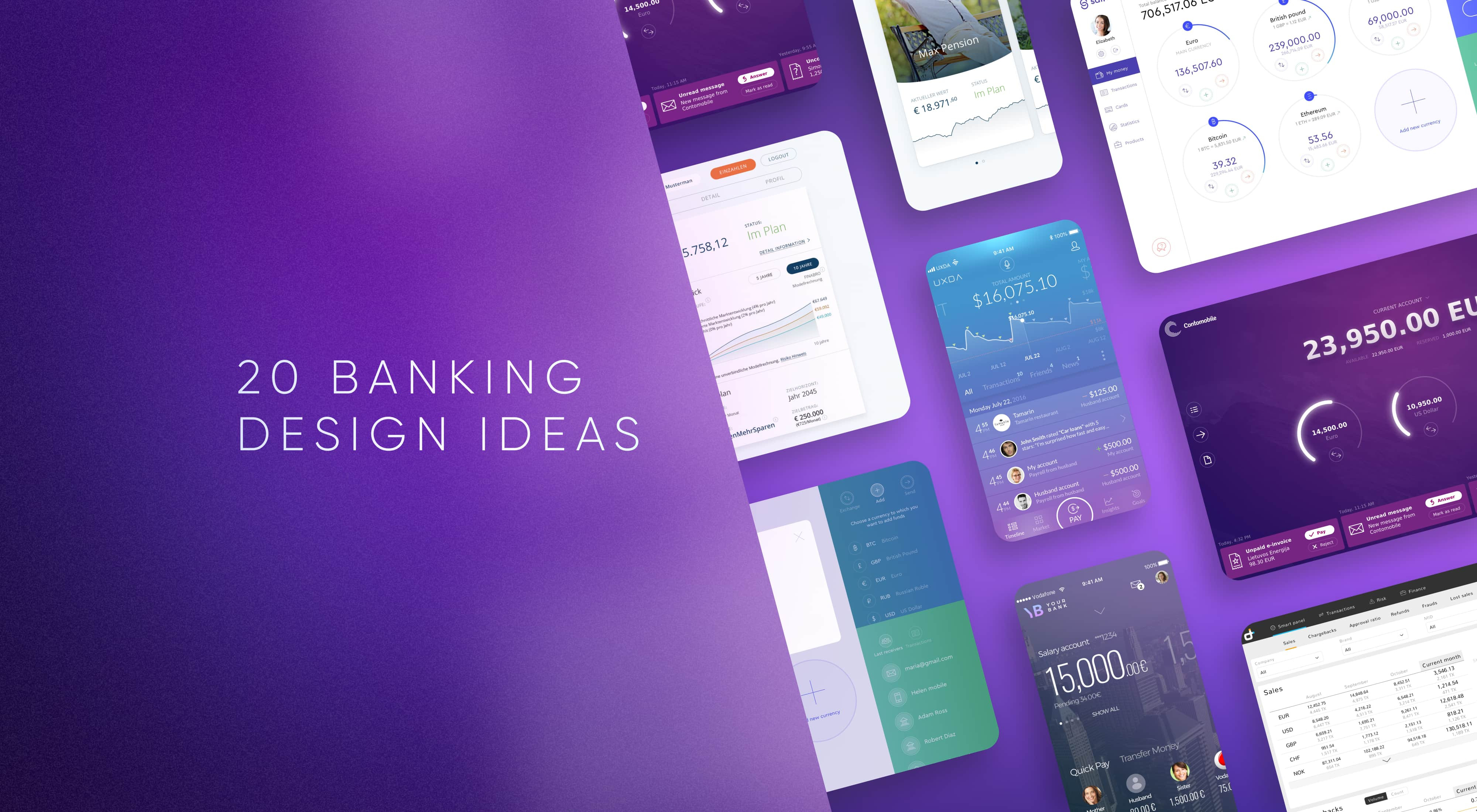


Financial dashboard design is the process of organizing financial data, insights and actions into an interface that helps users quickly understand their current financial position and decide what to do next. In banking and fintech, this may include balances, accounts, transactions, cash flow, upcoming payments, investments, alerts and contextual actions. A good financial dashboard should not display everything a product knows about the customer. It should prioritize the information that matters most in the current context, reduce the effort required to interpret financial data and provide clear paths to the actions users are most likely to take.
What Should a Banking or Fintech Dashboard Show?
A banking or fintech dashboard should show the information users need to understand their financial situation and take the next relevant action. The exact content depends on the product and customer, but most financial dashboards should prioritize:
- Current financial position: available balances, total assets, liabilities or portfolio value;
- Recent activity: transactions, money movements and account changes;
- Money in motion: upcoming payments, pending transfers, subscriptions or scheduled transactions;
- Financial trends: income, spending, cash flow, investment performance or relevant KPIs;
- Important exceptions: failed payments, overdue bills, unusual activity or actions requiring attention;
- Contextual actions: transfer money, pay a bill, add funds, invest or complete another high-frequency task;
- Relevant insights: information that helps the user understand what changed and whether action is needed.
The dashboard should prioritize these elements according to user context rather than presenting every available banking feature at once. Its purpose is to answer three questions quickly: Where do I stand? What changed? What should I do next?
Motion in a financial dashboard should clarify change, hierarchy or causality rather than exist as decoration. It can help users understand that a balance has updated, reveal additional information progressively, maintain orientation during navigation or connect an action with its financial result.
In financial products, animation should remain predictable and restrained. The purpose is to make state changes easier to understand—not to make money movement more entertaining.
Mobile Financial Dashboard Examples by UXDA
This collection explores 20 banking and fintech dashboard UI examples designed by UXDA for real financial products across retail banking, payments, personal finance, pensions, crypto and online banking. Beyond visual inspiration, the examples demonstrate different approaches to information hierarchy, financial data visualization, navigation and contextual interaction.
1. CR2 Consumer Banking Dashboard: Creating an Immediate Financial Overview
A consumer banking dashboard needs to help customers understand their financial position before asking them to navigate deeper into the product. This interface brings account balances, financial status and relevant banking actions into one clear overview, helping users quickly orient themselves and decide what to do next.
Dashboard design focus: account visibility, financial overview, information hierarchy and contextual actions.

Financial Dashboard Design in CR2 Consumer Banking by UXDA
2. Social Banking Dashboard: Connecting Financial Overview With Money Movement
A social banking dashboard should give users a clear sense of their current financial position while keeping frequent actions immediately accessible. This interface connects the account overview with a prominent send-money action, reducing the distance between understanding available funds and acting on them.
Dashboard design focus: financial orientation, primary actions, money movement and interaction efficiency.
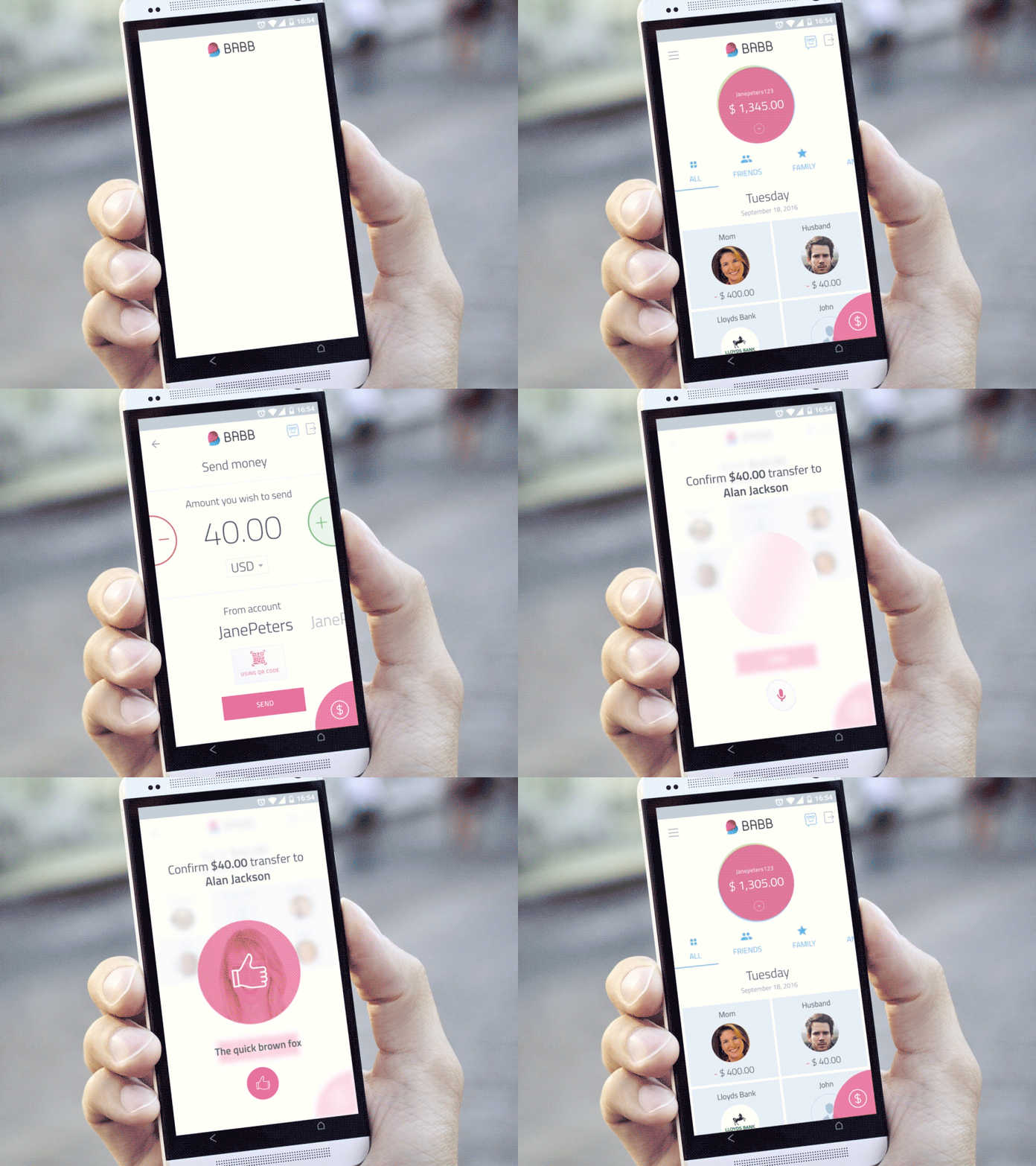
Open Dashboard and Send Money in Social Banking App Design by UXDA
3. Retail Banking Dashboard: Connecting Account Status With Transaction History
A retail banking dashboard has to show both where customers stand financially and what activity has shaped that position. This interface combines account information with a transaction feed, allowing users to move naturally from a high-level overview into recent financial activity without unnecessary navigation.
Dashboard design focus: balance visibility, transaction history, progressive detail and financial activity.
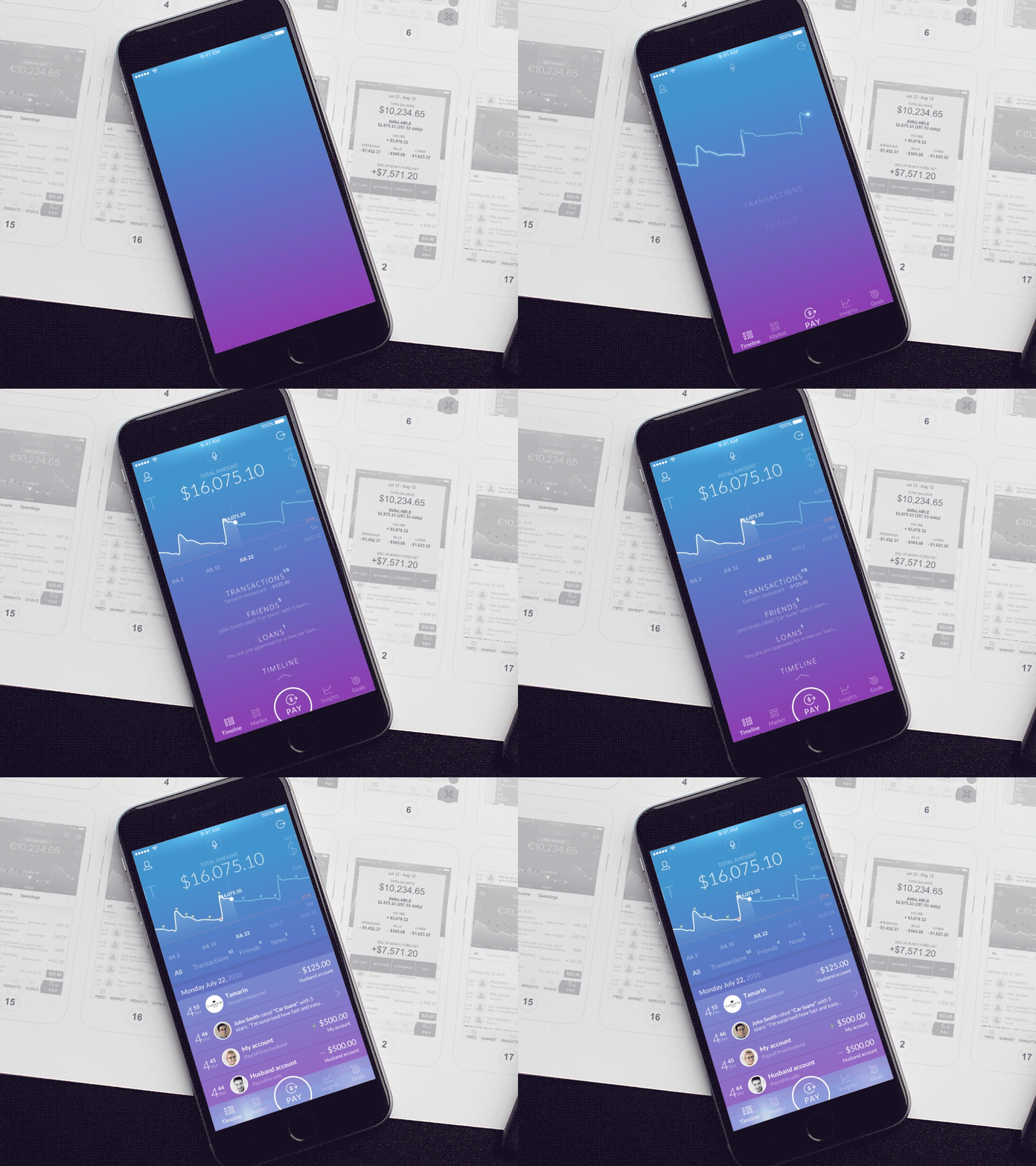
Banking Dashboard Design and Transactions History Feed in Retail Banking by UXDA
4. Pension Dashboard: Making Long-Term Financial Progress Easier to Understand
Pension products deal with long-term financial decisions that can feel distant and difficult to interpret. This dashboard presents retirement information in a structured overview, helping users understand their current position, monitor progress and access the details needed to make more informed long-term financial decisions.
Dashboard design focus: retirement progress, portfolio visibility, long-term financial data and information hierarchy.
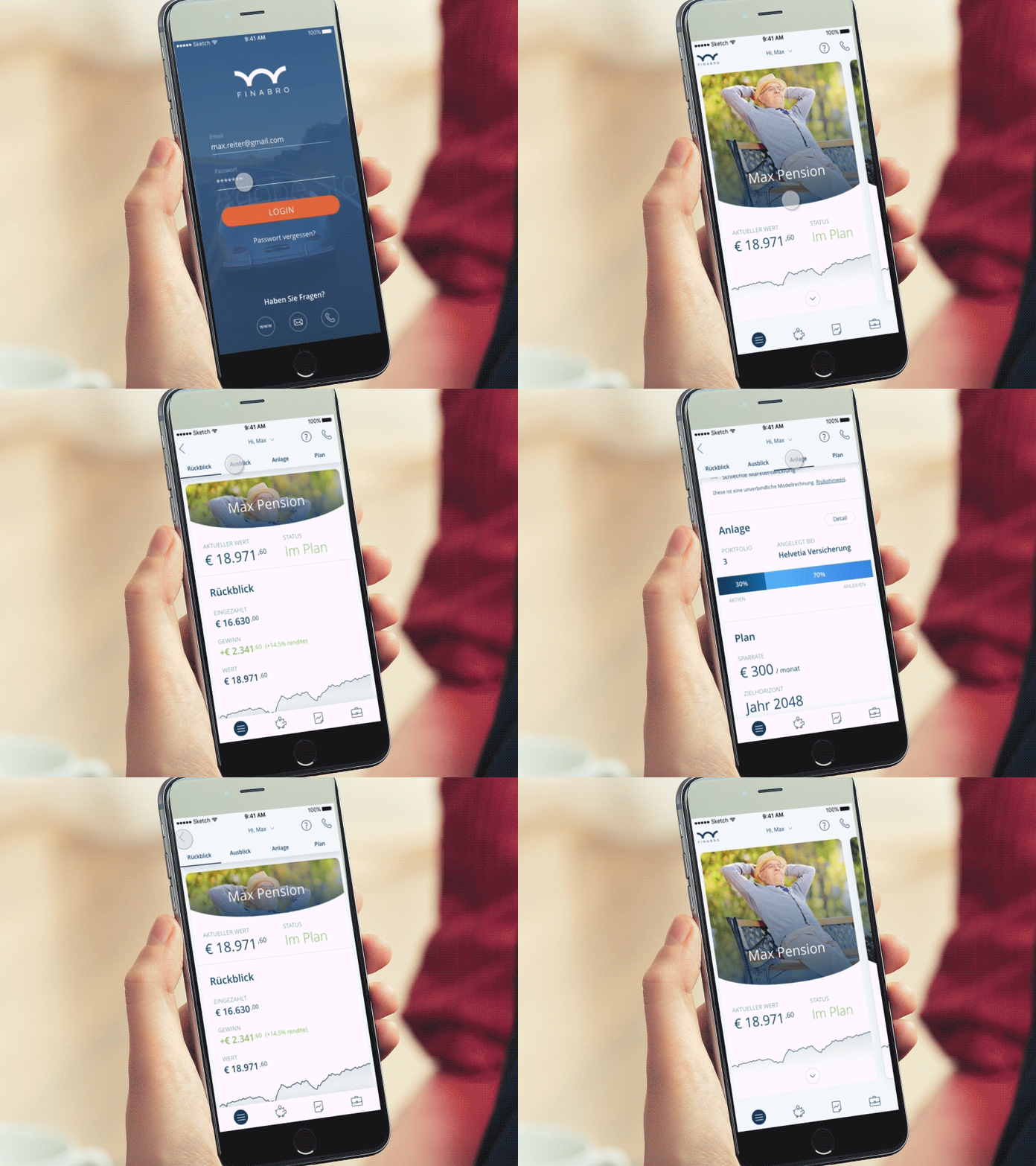
Financial Dashboard Design in Pension Solution by UXDA
5. Personal Finance Dashboard: Turning Financial Activity Into Useful Insight
A personal financial management dashboard needs to help users move beyond individual transactions and understand broader patterns in their money. This interface organizes financial information around balances, activity and personal finance insights, making it easier to connect everyday spending with the user’s overall financial position.
Dashboard design focus: personal finance overview, spending visibility, financial insights and data hierarchy.

Mobile Banking UI Design in PFM Module by UXDA
6. Challenger Bank Dashboard: Making Accounts and Financial Actions Easy to Access
A challenger bank dashboard needs to combine simplicity with quick access to everyday banking services. This interface gives priority to account information and relevant actions, helping users understand their financial position while keeping navigation lightweight and focused around their most likely next steps.
Dashboard design focus: account overview, action prioritization, intuitive navigation and digital banking simplicity.

Open Dashboard and Check Accounts UX Design in Challenger Bank User Interface by UXDA
7. Cryptocurrency Wallet Dashboard: Making Digital Assets Easier to Monitor
A cryptocurrency wallet dashboard has to communicate balances, asset values and market changes without overwhelming users with constantly changing information. This interface organizes digital holdings into a clear financial overview, helping users quickly understand what they own and how their assets are performing.
Dashboard design focus: asset visibility, portfolio overview, market information and digital asset management.

Mobile Fintech App Design in Cryptocurrency Wallet UI by UXDA
8. Social Banking Account Creation: Making Onboarding Feel Clear and Manageable
Creating a financial account often requires users to provide sensitive information and move through several verification steps. This interface structures the onboarding process into a clear sequence, helping users understand what information is required, why it matters and how far they are from completing account creation.
Interaction design focus: onboarding clarity, progressive disclosure, form hierarchy and completion guidance.
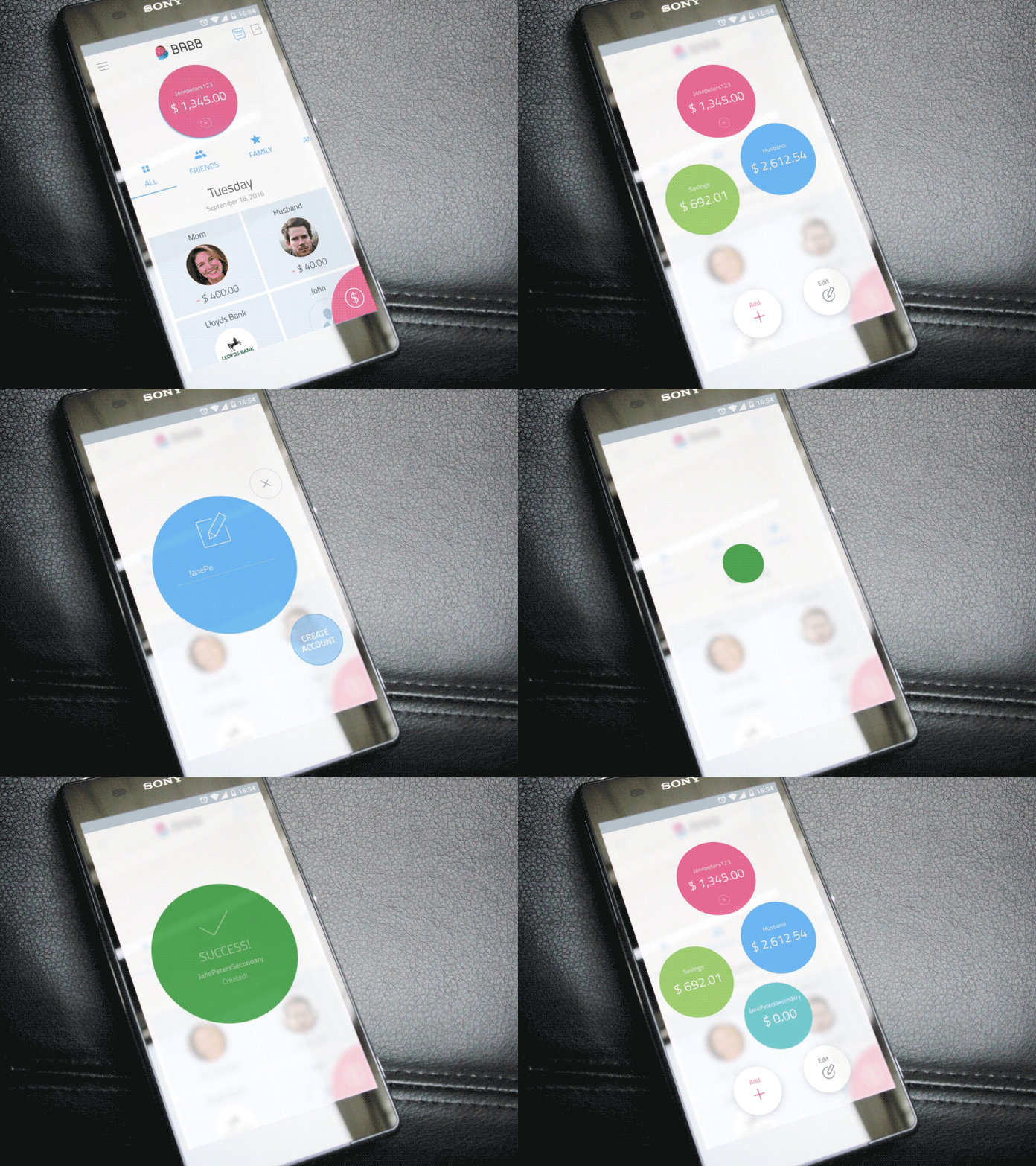
Create Account UX Design in Social Banking App UI by UXDA
9. CR2 Consumer Banking Account Settings: Organizing Personal and Security Controls
Banking account settings can become complex when profile information, security controls, preferences and service options are grouped together. This interface structures settings into clear categories, helping users find and manage important account controls without navigating through a dense list of unrelated options.
Interaction design focus: settings architecture, account controls, security options and navigation clarity.
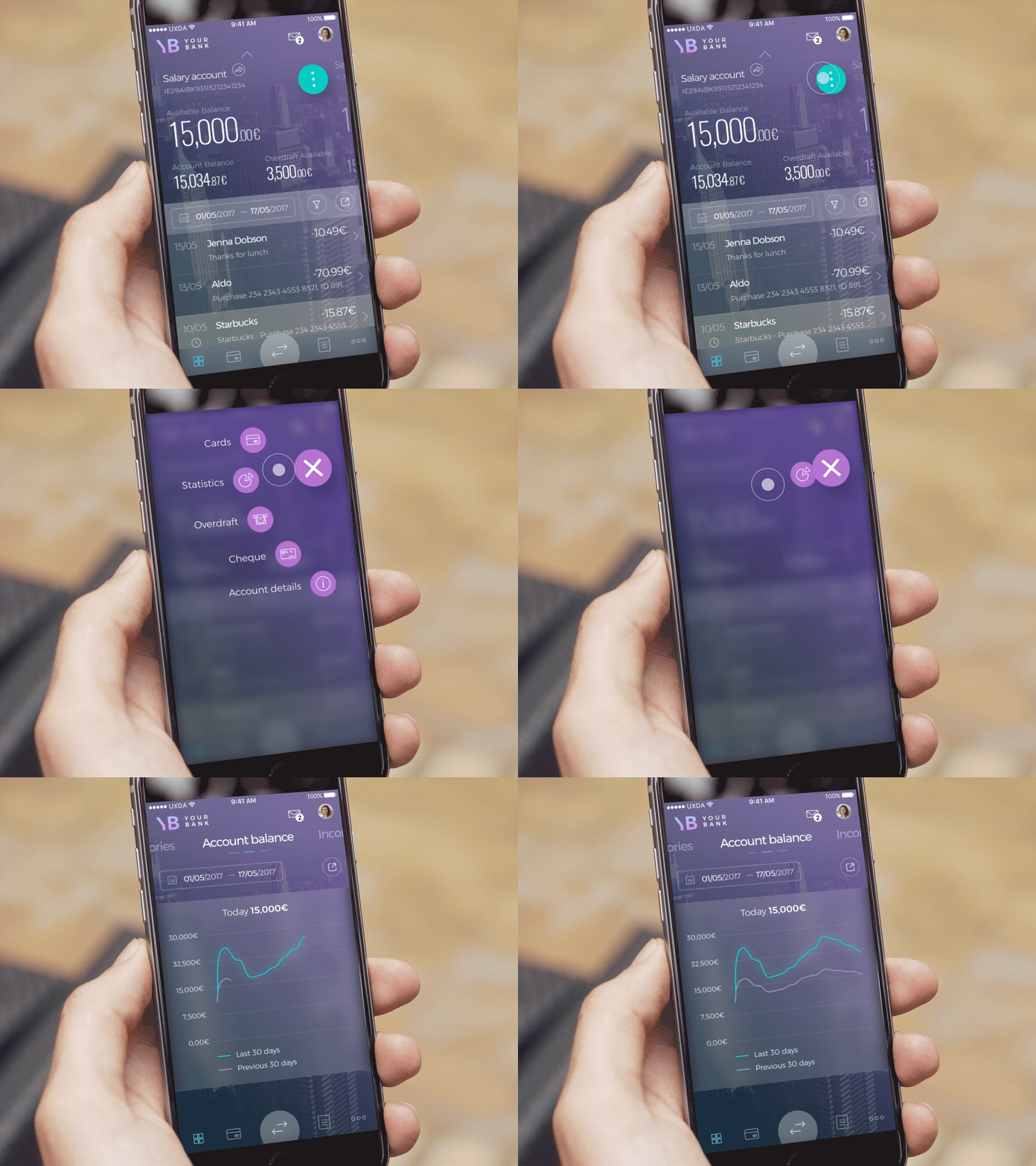
Account Settings in CR2 Consumer Banking Design by UXDA
10. Mobile Banking Transaction Details: Making Financial Activity Easy to Verify
Transaction details need to help customers quickly understand what happened, when it happened and where their money went. This interface organizes the most important transaction information first while keeping supporting details accessible, making it easier to verify payments and review financial activity.
Interaction design focus: transaction clarity, information hierarchy, payment details and financial verification.
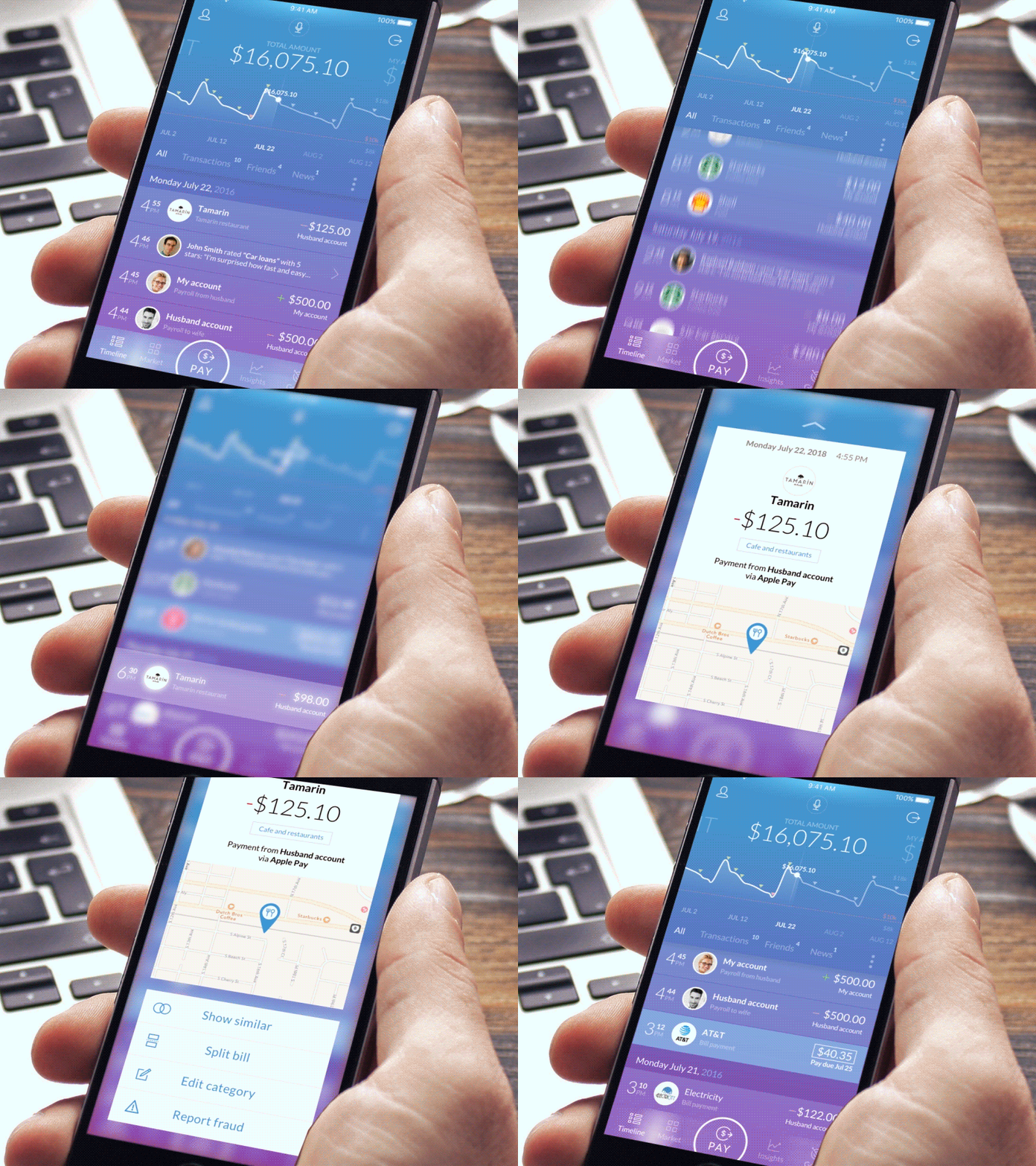
Transaction Details in Mobile Banking App Design by UXDA
11. Cryptocurrency Exchange Flow: Simplifying Bitcoin Conversion
Exchanging cryptocurrency involves values, rates and confirmations that need to remain clear throughout the process. This interface guides users through converting Bitcoin while keeping the amount, exchange information and resulting value visible, reducing uncertainty before the transaction is confirmed.
Interaction design focus: exchange clarity, value transparency, transaction confirmation and digital asset conversion.
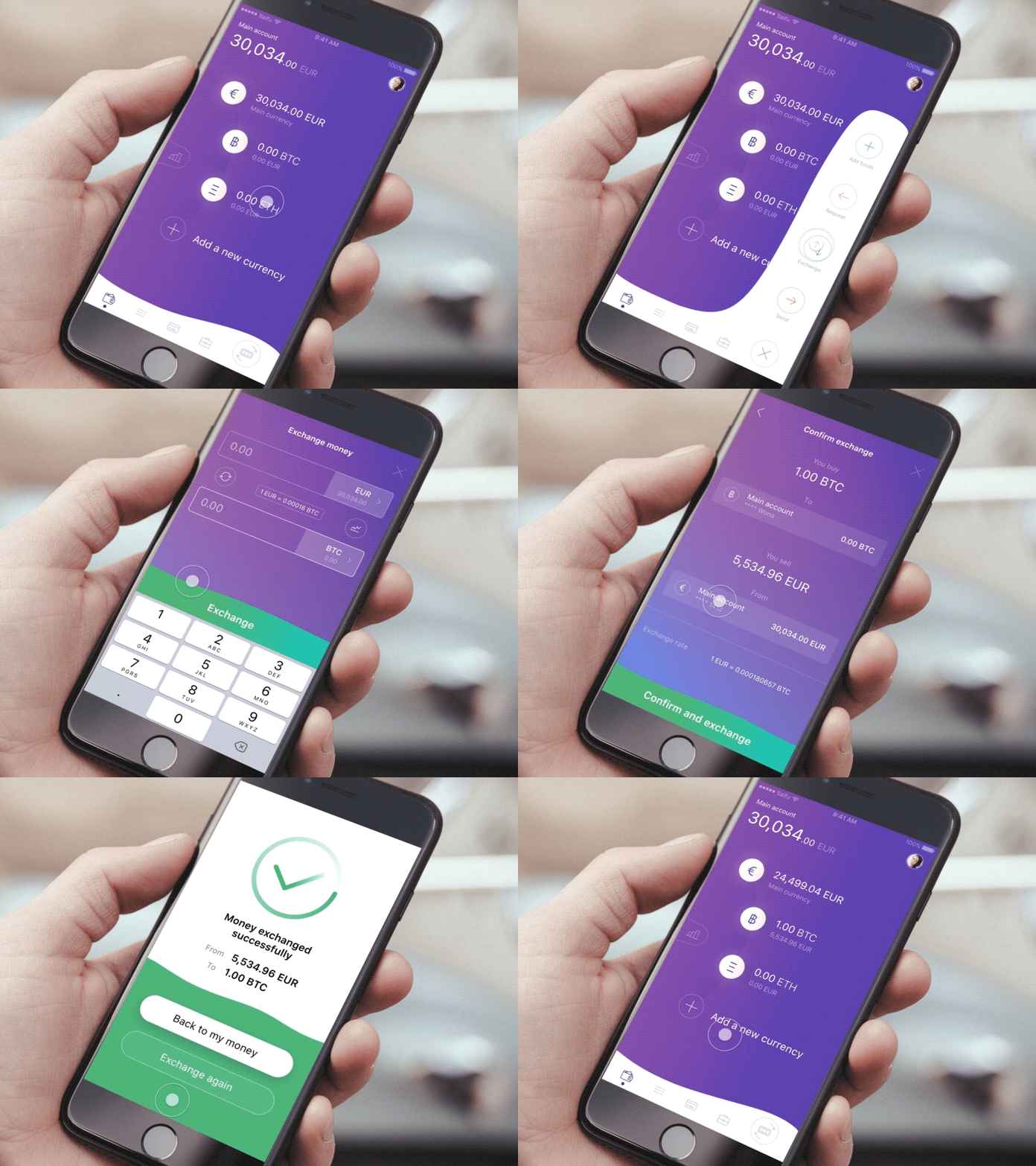
Exchange Bitcoins in Cryptocurrency Wallet UI Design by UXDA
12. Social Banking Cash-Out Flow: Making Withdrawal Actions Clear
A cash-out flow needs to help users understand how much money they are withdrawing, where it is going and what will happen after confirmation. This interface keeps the amount and destination central to the interaction, supporting a straightforward path from intent to completed withdrawal.
Interaction design focus: withdrawal clarity, amount entry, destination selection and transaction confirmation.
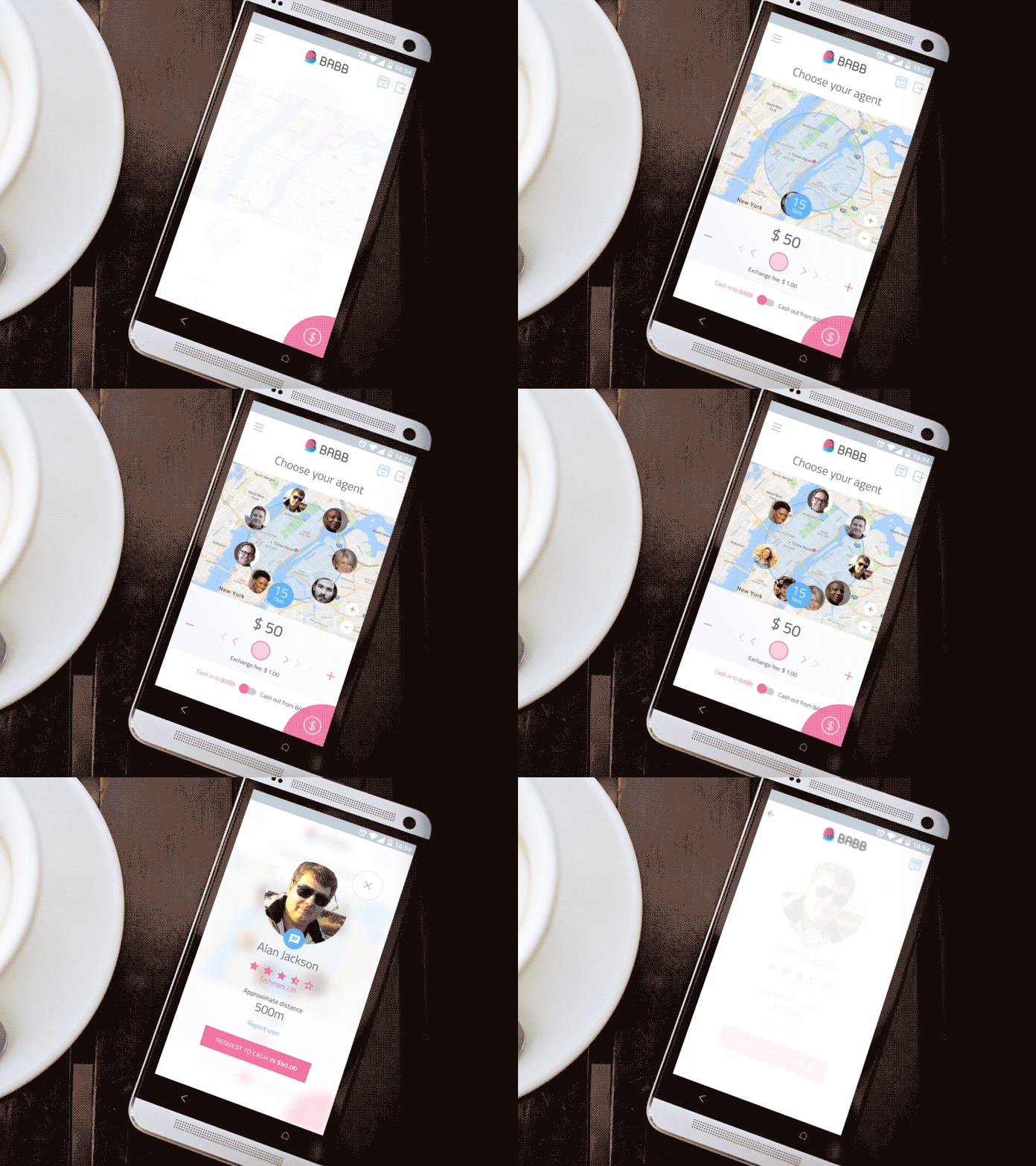
Cash Out in Social Banking App Design by UXDA
13. CR2 Consumer Banking Transfer Flow: Moving Money Between Accounts
Transfers between a customer’s own accounts should feel fast while still making the source, destination and amount unmistakably clear. This interface structures the transfer around those essential decisions, reducing unnecessary steps while giving users enough context to confirm the movement of funds confidently.
Interaction design focus: account selection, transfer amount, transaction clarity and confirmation.
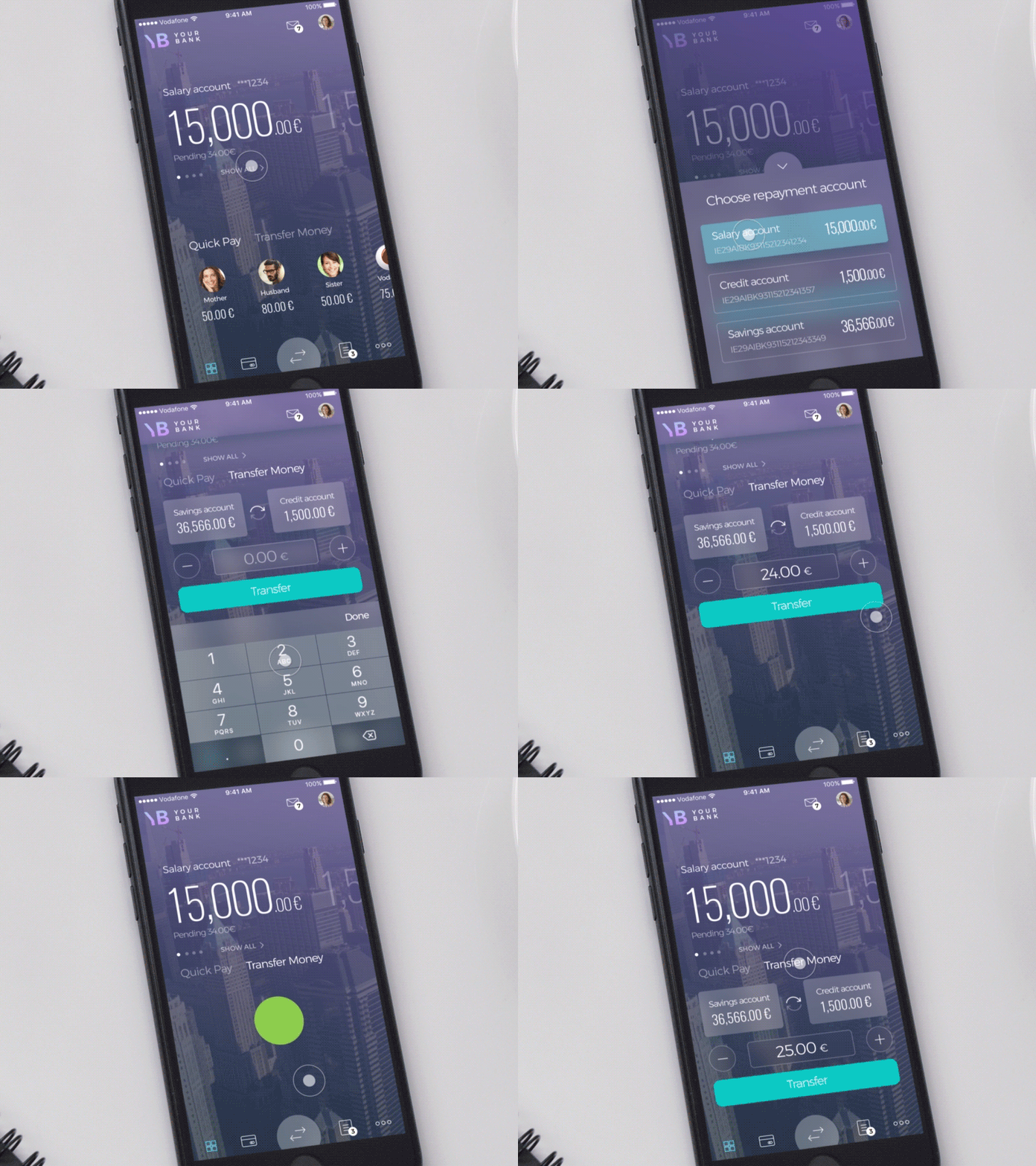
Transfer Money Between Accounts in CR2 Consumer Banking UI Design by UXDA
14. Retail Banking Payment Menu: Organizing Everyday Payment Options
A payment menu often has to accommodate several different financial tasks without forcing users to search through a long list of services. This interface groups payment options into a clear hierarchy, helping users identify the right payment type and move quickly into the corresponding journey.
Interaction design focus: payment navigation, service grouping, task prioritization and menu hierarchy.
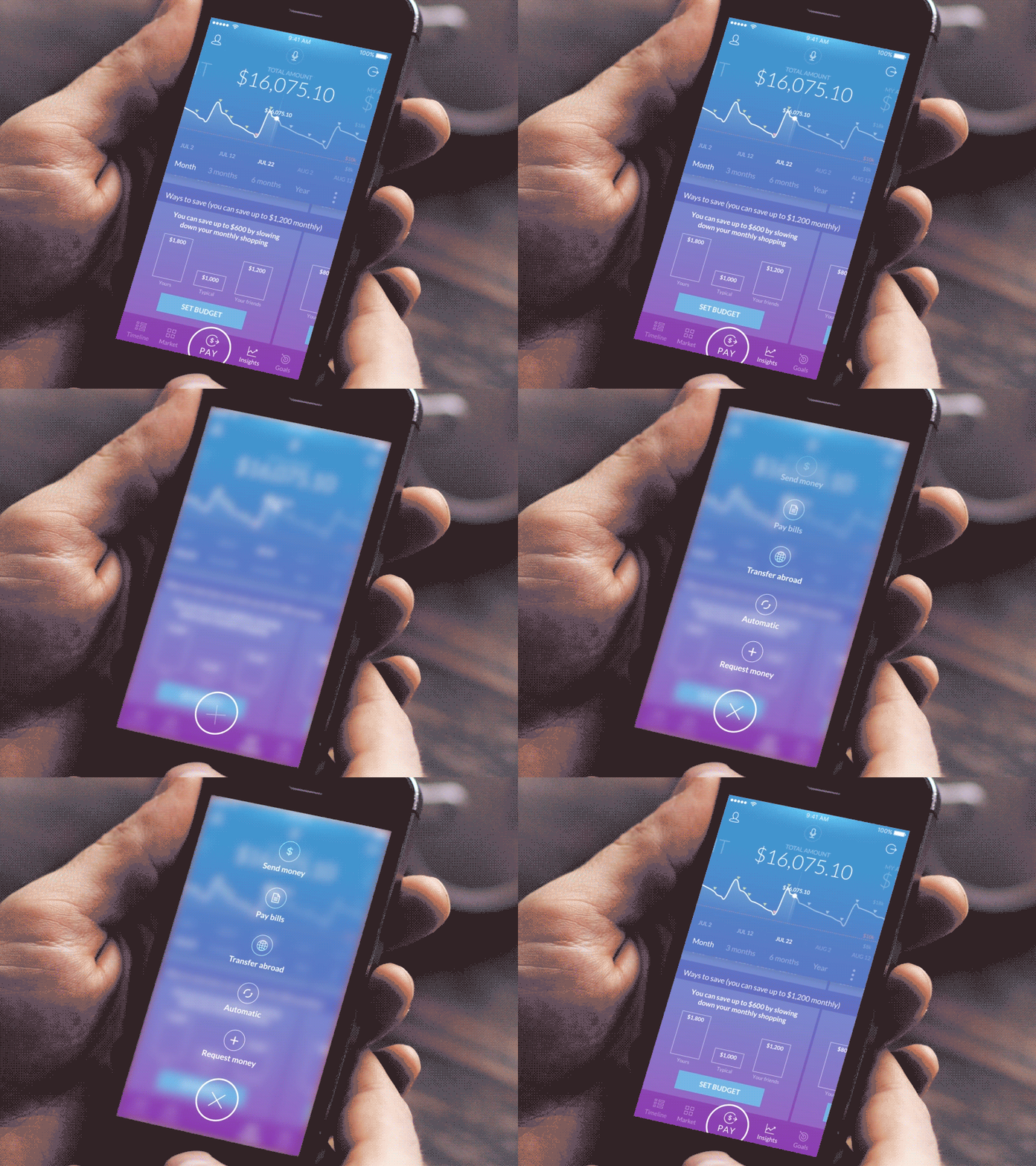
Payment Menu in Retail Banking Interface Design by UXDA
15. Social Banking Loan Request: Making Borrowing Steps Easier to Understand
Applying for a loan can involve complex information around amounts, eligibility, repayment and approval. This interface structures the request around the information users need at each stage, helping them understand the borrowing process while keeping the next action clear.
A lending dashboard should help customers understand the current state of their loan before asking them to take another action. Useful information typically includes outstanding balance, next payment amount and date, repayment progress, interest or fee information where relevant, payment history and any action requiring attention.
For lending applications still in progress, the priority changes: users need application status, outstanding requirements, expected next steps and a clear way to continue.
The dashboard should reduce uncertainty around three things: what is owed, what happens next and whether the customer needs to act.
Interaction design focus: lending journey, application clarity, financial inputs and progress guidance.

Loan Request in Social Banking App Design by UXDA
This article is from 2018. Check latest financial dashboards by UXDA in our portfolio >>
Desktop Financial Dashboard Examples by UXDA
1. Online Banking Dashboard: Connecting Financial Overview With Transaction History
A desktop banking dashboard needs to provide a comprehensive view of accounts and activity without overwhelming users with information. This interface combines account status with transaction history, helping customers understand their current financial position while giving them direct access to the activity behind recent changes.
Dashboard design focus: account overview, transaction visibility, desktop information hierarchy and financial activity.

Dashboard and Transactions History in Online Banking Design by UXDA
2. PFM Internet Banking Dashboard: Turning Financial Data Into a Clear Personal Overview
A personal financial management dashboard should help users understand how everyday transactions affect their broader financial situation. This interface organizes balances, spending and financial insights into a structured desktop view, making it easier to identify patterns and explore the details behind them.
Dashboard design focus: personal finance overview, spending analysis, financial insights and data organization.

Dashboard in PFM Internet Banking Design by UXDA
3. Merchant Financial Dashboard: Prioritizing Business Performance and Money Movement
A merchant dashboard needs to give business users a quick understanding of financial performance while keeping operational information close at hand. This interface brings together payment activity, transaction data and key financial indicators, helping merchants monitor what is happening across their business and identify areas that require attention.
Dashboard design focus: business performance, payment activity, financial KPIs and operational visibility.

Financial Dashboard Design in Merchant Service by UXDA
4. Pension Fund Dashboard: Making Long-Term Investment Information Easier to Navigate
A pension fund dashboard has to present long-term financial information in a way that feels understandable rather than distant or overly technical. This interface structures portfolio value, performance and supporting investment data into a clear overview, helping users monitor progress and explore deeper information when needed.
Dashboard design focus: pension portfolio visibility, investment performance, long-term progress and financial data hierarchy.

Financial Dashboard UI Design for Pension Fund by UXDA
5. Cryptocurrency Banking Interface: Adding and Managing New Accounts
Adding a new cryptocurrency account introduces decisions around asset type, account setup and future management. This interface structures those choices into a clear flow, helping users understand what they are creating and move from account selection to setup without unnecessary complexity.
Interaction design focus: account creation, asset selection, setup clarity and digital asset management.

Add New Account Cryptocurrency Bank UI Design by UXDA
7 Financial Dashboard Design Principles for Banking and Fintech
The strongest financial dashboards are designed as part of the whole customer experience rather than as isolated home screens.
What appears on the dashboard depends on what happened before it, what the customer is trying to accomplish now and what the product expects them to do next. Accounts, cards, investments, payments, financing and insights therefore need a shared information architecture and consistent interaction logic.
This is why UXDA approaches dashboard design through Systemic UX: optimizing not only individual components, but the relationships between information, journeys, services and customer context across the financial ecosystem.
1. Start With the User's Financial Position
The first view should establish orientation: balance, net position, available funds, portfolio value or another metric appropriate to the product.
2. Prioritize Decisions Instead of Available Data
A dashboard is not a database interface. Information deserves prominence according to what the user needs to understand or act upon.
3. Separate Status, Change and Action:
Status: Where do I stand?
Change: What happened?
Action: What needs my attention?
4. Make Financial Numbers Easy to Interpret
Currency, sign, period, comparison and status should be unambiguous. A number without context creates more cognitive work instead of insight.
5. Surface Exceptions Before Routine Information
Failed payments, approaching limits, overdue bills, unusual changes and approval requests generally deserve stronger visibility than normal activity.
6. Use Progressive Disclosure for Complexity
Show enough information to support orientation and action, then allow users to drill down into transaction, account or analytical detail.
7. Adapt the Dashboard to the Financial Context
A retail customer, business owner, investor and banker do not need the same dashboard. Hierarchy should follow the user's role and goals rather than a universal component template.
Financial Dashboard Design: Key Questions
What is financial dashboard design?
Financial dashboard design is the organization of financial information, status and actions into an interface that helps users understand their current position, identify meaningful changes and decide what to do next.
What should a banking dashboard include?
A banking dashboard typically prioritizes account balances, recent transactions, upcoming payments, important alerts and frequently used actions. Additional content can include spending insights, savings, investments, borrowing and personalized recommendations depending on the customer.
What makes a good fintech dashboard?
A good fintech dashboard presents the most important financial status first, provides context for changes, surfaces exceptions and connects insights with relevant actions. Its structure should reflect the specific financial task rather than copy a generic analytics dashboard.
How many KPIs should a financial dashboard show?
There is no universal number. The dashboard should display only the indicators needed for the user's primary decisions, while less important metrics can be available through deeper views or progressive disclosure.
How should financial dashboards handle complex data?
Use clear hierarchy, meaningful grouping, consistent number formatting and progressive disclosure. Summary information should support orientation, while detailed charts, transactions and analytical data remain available for users who need deeper investigation.
What is the difference between a dashboard and a banking home screen?
A banking home screen may primarily provide navigation and access to services. A financial dashboard goes further by summarizing financial status, relevant changes and actions in a way that helps the user understand their situation and make decisions.
Get UXDA Research-Based White Paper "How to Win the Hearts of Digital Customers":

A financial dashboard should make complex financial information easier to understand, not simply fit more data onto a screen. UXDA partners with banks and financial companies to define dashboard information architecture, prioritize customer and business needs and turn complex financial ecosystems into clear digital experiences across mobile and web.
Request a Private Briefing:
- E-mail us at info@theuxda.com
- Chat with us in Whatsapp
- Send a direct message to UXDA's CEO Alex Kreger on Linkedin